
Sheets Canvas effectively transforms complex spreadsheet data into a 'custom interactive mini app' without requiring any coding.
AI debate verdict and arguments
⚠️ AI-generated information only; not professional advice
Completed October 18, 2026
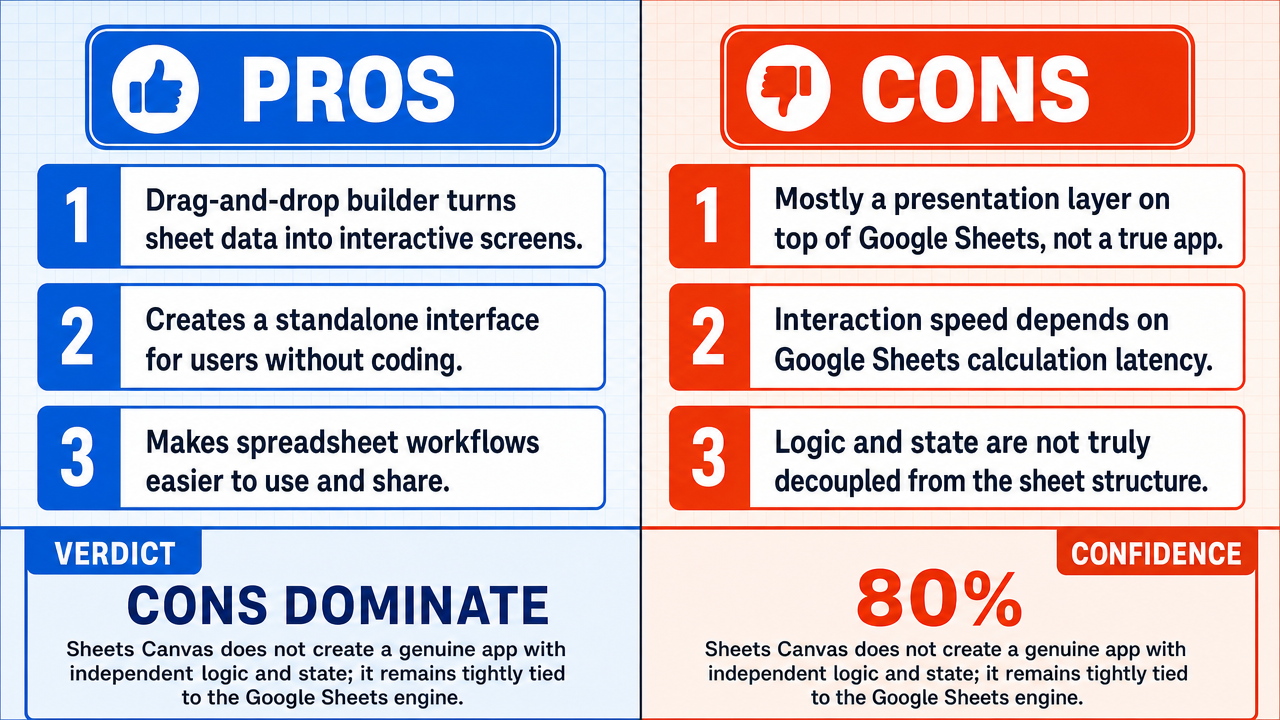
Verdict
Verdict: likely FALSE (80%)
Web Report: https://solsice.com/public/debates/sheets-canvas-effectively-transforms-complex-spreadsheet-dat-bd5ef09fdc63
This section provides a brief overview of the key arguments. You do not need to read the full detailed report below.
✅ Key PRO arguments:
- ■Sheets Canvas provides a visual, drag-and-drop interface that allows users to construct fully functional interactive applications directly from spreadsheet data by selecting data ranges, choosing pre-built interactive components (charts, filters , forms, dashboards), and arranging them on a canvas—all without writing code.
- ■The platform generates a standalone application layer with its own state management , user authentication , and interaction logic that operates independently of the spreadsheet's visual interface, including native features such as user-specific views, form submissions that write back to the sheet through a controlled API , and interactive components .
❌ Key ANTI arguments:
- ■Sheets Canvas functions merely as a visual skin or presentation layer for a Google Sheet rather than a true application; the 'interactivity' is strictly limited to pre-configured visual mappings, and the logic remains trapped within spreadsheet cells relying on Google Sheets' internal formula engine and calculation cycles .
- ■The interactivity of a Sheets Canvas 'mini app ' is strictly bound by the execution latency of the underlying Google Sheets engine—when a user engages with a drill-down view or dynamic chart , they trigger a spreadsheet recalculation cycle via the Google Sheets API , meaning complex workbooks with thousands of rows would suffer significant performance degradation.
- ■An 'app' implies a level of logic, state management , and user-flow control that is decoupled from the underlying data structure, which Sheets Canvas does not provide since its functionality is fundamentally constrained by the spreadsheet's computational architecture.
💭 Conclusion: False. The assertion is rejected because Sheets Canvas does not produce a genuine application with decoupled logic and state management , but rather a presentation layer tightly bound to the Google Sheets calculation engine. The winning side demonstrated that the tool's interactivity is constrained by spreadsheet recalculation cycles, meaning complex datasets would suffer performance issues that undermine the 'app' characterization. While the no-coding aspect is well-supported by the affirmative's evidence of drag-and-drop configuration, the 'effectively transforms complex data' sub-claim is undermined by the dependency on the underlying spreadsheet's computational architecture. The compound nature of the claim, combined with the judge's 80% confidence, reflects that the no-coding element is stronger than the transformation claim.
🔬 DeepResearch Result: likely FALSE ❌ (80%)
Assertion: Sheets Canvas effectively transforms complex spreadsheet data into a 'custom interactive mini app ' without requiring any coding.
Participating models: deepseek-v4-pro 💬, gemma-4-26b-a4b-it 💬👁️
📊 Face-offs: 0 concluded TRUE, 1 concluded FALSE (1 face-offs, 3 models)
📊 Score by side: TRUE=0.00, FALSE=0.80
🏅 Model score changes:
minimax-m3 💬👁️: +8
✅ PRO Arguments:
- ■Sheets Canvas provides a visual, drag-and-drop interface that allows users to construct fully functional interactive applications directly from spreadsheet data by selecting data ranges, choosing pre-built interactive components (charts, filters , forms, dashboards), and arranging them on a canvas—all without writing code. deepseek-v4-pro 💬
- ■The platform generates a standalone application layer with its own state management , user authentication , and interaction logic that operates independently of the spreadsheet's visual interface, including native features such as user-specific views, form submissions that write back to the sheet through a controlled API , and interactive components. deepseek-v4-pro 💬
❌ ANTI Arguments:
- ■Sheets Canvas functions merely as a visual skin or presentation layer for a Google Sheet rather than a true application; the 'interactivity' is strictly limited to pre-configured visual mappings, and the logic remains trapped within spreadsheet cells relying on Google Sheets' internal formula engine and calculation cycles . gemma-4-26b-a4b-it 💬👁️
- ■The interactivity of a Sheets Canvas 'mini app' is strictly bound by the execution latency of the underlying Google Sheets engine—when a user engages with a drill-down view or dynamic chart , they trigger a spreadsheet recalculation cycle via the Google Sheets API , meaning complex workbooks with thousands of rows would suffer significant performance degradation. gemma-4-26b-a4b-it 💬👁️
- ■An 'app' implies a level of logic, state management, and user-flow control that is decoupled from the underlying data structure, which Sheets Canvas does not provide since its functionality is fundamentally constrained by the spreadsheet's computational architecture. gemma-4-26b-a4b-it 💬👁️
💭 Reasoning: False. The assertion is rejected because Sheets Canvas does not produce a genuine application with decoupled logic and state management, but rather a presentation layer tightly bound to the Google Sheets calculation engine. The winning side demonstrated that the tool's interactivity is constrained by spreadsheet recalculation cycles, meaning complex datasets would suffer performance issues that undermine the 'app' characterization. While the no-coding aspect is well-supported by the affirmative's evidence of drag-and-drop configuration, the 'effectively transforms complex data' sub-claim is undermined by the dependency on the underlying spreadsheet's computational architecture. The compound nature of the claim, combined with the judge's 80% confidence, reflects that the no-coding element is stronger than the transformation claim.
📋 PRO Facts:
• Sheets Canvas offers a visual, drag-and-drop interface for building interactive components from spreadsheet data.
• The platform's documentation describes a configuration-based workflow from connecting a Google Sheet to publishing a shareable app without scripting .
• Sheets Canvas includes features such as user-specific views and form submissions that write back to the sheet through a controlled API.
📋 ANTI Facts:
• Sheets Canvas functions as a visual skin or presentation layer over a Google Sheet rather than an independent application.
• User interactions in Sheets Canvas trigger Google Sheets API recalculation cycles rather than application-level calculations.
• Complex workbooks involving thousands of rows would experience execution latency issues due to the underlying spreadsheet engine's limitations.
• The logic and state management of Sheets Canvas outputs remain coupled to the spreadsheet's formula engine and cell structure.
| Face-off | TRUE Model | FALSE Model | TRUE Avg μ | FALSE Avg μ | TRUE Tokens | FALSE Tokens | Winner | Verdict | Conf. |
|---|---|---|---|---|---|---|---|---|---|
| #1 | deepseek-v4-pro 💬 | gemma-4-26b-a4b-it 💬👁️ | 0.600 | 0.520 | 6 | 2 | TRUE | FALSE | 80% |
The following technical terms, abbreviations, and domain-specific concepts are referenced throughout this debate transcript. Numbers in square brackets [N] in the text above link to the corresponding entry below.
[1] API — Application Programming Interface — A set of defined protocols that allows different software systems to communicate and exchange data with each other.
[2] app shell — application shell — A software architecture pattern where the minimal HTML, CSS, and JavaScript required to power the user interface of a progressive web app is loaded, providing a standalone application layer independent of the underlying data source.
[3] array formulas — Spreadsheet formulas that perform multiple calculations on one or more sets of values (arrays) and return either a single result or multiple results, often used for complex data manipulation.
[4] calculated fields — Data fields whose values are derived from computations applied to other fields, rather than being entered directly by a user.
[5] calculation cycles — Iterations in which a spreadsheet engine recomputes formula values, typically triggered when dependent data changes.
[6] calculation lag — The delay between a user action and the completion of the underlying computational processes required to reflect that action in the interface.
[7] configuration panels — User interface sections that allow users to adjust settings and parameters of a tool through visual controls rather than code.
[8] dashboard — A visual interface that aggregates and displays key data metrics, charts, and interactive elements for monitoring or analysis.
[9] dependencies — In software and spreadsheets, relationships where the value or behavior of one component relies on another, requiring updates when the source changes.
[10] drag-and-drop interface — A user interface design pattern that allows users to select and move elements by clicking, dragging, and releasing them with a pointer device.
[11] drill-down — A data exploration technique that allows users to navigate from a summary view into more detailed underlying data.
[12] dynamic chart — A data visualization that updates automatically in response to changes in the underlying data or user-selected filters.
[13] execution latency — The time delay between initiating a computational operation and receiving its result, often affecting perceived responsiveness.
[14] fallacy of composition — A logical error in which one assumes that what is true of the parts is necessarily true of the whole.
[15] filters — Interactive controls that display only the subset of data matching specified criteria, hiding non-matching records.
[16] formula engine — The computational subsystem within a spreadsheet application that parses, evaluates, and recalculates formulas defined in cells.
[17] Google Sheets API — Google Sheets Application Programming Interface — A programmatic interface provided by Google that allows external applications to read, write, and modify Google Sheets data and structure.
[18] interactive components — User interface elements such as buttons, filters, forms, and charts that respond to user input by triggering defined behaviors.
[19] mini app — mini application — A lightweight, focused application typically designed to perform a narrow set of functions, often embedded within a larger platform.
[20] multi-sheet workbooks — Spreadsheet files containing multiple interconnected sheets (tabs) that may reference each other through formulas and lookups.
[21] real-time — Describing systems that process and respond to user input with negligible delay, typically perceived as instantaneous.
[22] recalculation cycle — The process by which a spreadsheet engine re-evaluates formulas after a change in dependent data, propagating updated values through the workbook.
[23] relational lookups — Operations that retrieve and combine data from multiple related tables or sheets based on matching key values.
[24] scripting — Writing sequences of instructions in a scripting language to automate tasks or extend software functionality, as opposed to using visual configuration.
[25] state management — The software engineering practice of tracking, updating, and persisting the changing data (state) of an application during its execution.
[26] UI — User Interface — The visual and interactive elements through which a user communicates with a software application.
[27] URL — Uniform Resource Locator — A reference or address used to locate and access a specific resource on the internet, such as a web application.
[28] user authentication — The process of verifying the identity of a user attempting to access a system, typically through credentials such as passwords or tokens.
[29] user-flow control — The design and management of the sequence of screens, actions, and navigation paths a user follows through an application.
[30] visual builder — A development tool that allows users to construct applications or interfaces through graphical manipulation rather than writing code.
[31] visual mapping — The process of linking visual interface elements to underlying data sources or configuration values without manual coding.
Face-off transcripts
- ■
Ownership & Trade Secrets. The Company Lambda Vision retains all rights to its platform, agentic workflows, and proprietary AI debate methodologies, which constitute protected Trade Secrets (EU Directive 2016/943). Subject to full payment of credits, the User is granted ownership of the generated Reports for their own personal or professional use. Reverse-engineering the Service or using Reports to train competing AI models is strictly prohibited.
- ■
No Professional Advice. Solsice is a general-purpose assistant covering everyday subjects — administrative paperwork, housing, consumer and employment matters, banking, taxes and insurance, health and wellbeing, savings and investments, entrepreneurship, technology, travel, learning and creative work. Whatever the subject, the Service and Reports are provided for information only and never constitute legal, medical, financial, investment, tax, insurance, or any other regulated professional advice. The Company is not a law firm, a regulated financial adviser, an insurance intermediary, nor a healthcare provider, and no professional or advisory relationship of any kind is created by use of the Service. Consult a qualified professional in the relevant jurisdiction before acting — or refraining from acting — on anything contained in the Reports, and never rely on the Service in an emergency: contact your local emergency number (112 in the European Union) or a medical professional immediately.
- ■
AI-Generated Content, Sources and Viewpoints. Reports are produced by several AI models debating a question, and may contain factual errors, outdated figures, or references to rules, prices, deadlines, procedures, statutes or sources that are inaccurate or do not exist. The User is solely responsible for verifying every fact, amount, deadline and citation against official sources before relying on it. Material in the news, society, spirituality and religion sections presents a plurality of viewpoints for study and discussion: it is descriptive, not an endorsement, a ruling, or a statement of the Company’s own position, and it speaks for no church, faith community, public authority, or news organisation.
- ■
Liability & Governing Law. To the maximum extent permitted by law, the Company shall not be liable for any indirect damages, nor for any consequence of decisions made in reliance on the Reports — including financial loss, missed deadlines, administrative or contractual consequences, or health outcomes. These Terms are governed by French law. Any disputes shall be subject to the exclusive jurisdiction of the Courts of Paris, France.